
No APK, No Store Listing: How Ripper Runs on Phones
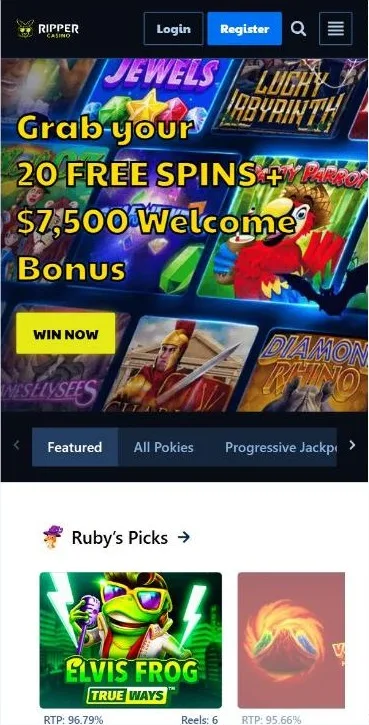
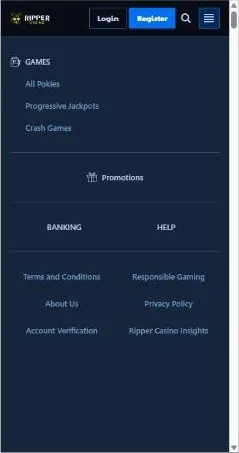
On a phone, Ripper is simply the website. The casino's own Help Centre FAQ puts it plainly: Ripper Casino is exclusively available on the browser as instant play. You will not find links to the App Store, Google Play or an APK file in the header, the menu or the footer.
What the site does have is a web app manifest. This small file lets your browser save Ripper to the home screen as a progressive web app under the name Ripper. Tapped from there, it opens in standalone mode: full screen, with no address bar, so it looks and feels like an app.
There is nothing to update by hand either. The icon always loads the current version of the site, so new games and promos appear as soon as the casino adds them.
How to Put Ripper on Your Home Screen
Adding Ripper to your home screen takes a few taps. Use Safari on an iPhone and Chrome on Android. The site does not show its own install banner, so everything happens through your browser menu.
Ripper Casino Web App for Android: Chrome Steps
On Android, Chrome turns the Ripper site into an app-style icon in five steps.
1 Open Ripper in Chrome
2 Tap the three-dot menu
3 Choose Install app
4 Confirm the install
5 Find the Ripper icon
Adding Ripper to an iPhone with Safari
On an iPhone, adding the icon only works from Safari. Here is the whole process.
1 Open Ripper in Safari
2 Tap Share
3 Choose Add to Home Screen
4 Check the name and tap Add
5 Launch from the icon
What You Get on Ripper Casino Mobile
Your phone opens the same site as your computer, so nothing is cut. Games, promotions, the cashier, login and support all work on mobile. Ripper says its 4,000+ games are available on mobile, tablet and PC, with every balance in AUD.
Games and Lobby on a Small Screen
The mobile lobby keeps the desktop tabs: Featured, All Pokies, Progressive Jackpots, Crash Games, Casino Games, Live Dealer and Scratch Cards. Search and filters sit on top, so you can sort by provider, volatility, RTP, hit frequency or min and max bet without endless scrolling.
Each game card lists RTP, reels, volatility and betways, and the Try button opens a free demo. Crown-marked Premium games are for real money only. Pragmatic Play and BGaming supply plenty of the hits, from Gates of Olympus 2500 and Wolf Gold to the crash game Aviamasters. Live Dealer holds six Pragmatic Play Live lobbies. Browse all Ripper Casino pokies by studio or RTP.
Bonuses and Promo Codes on Your Phone
Every promotion on the site works on your phone too. New players can claim the Ripper Casino welcome bonus: up to A$7,500 across the first four deposits. On top of that, code TOOEASY unlocks 20 free spins with no deposit. Enter codes in Bonuses and Rewards, then Redeem Bonus and Claim Bonus. Self-service cashback sits in the same menu. There is no extra bonus for adding the icon, but more Ripper Casino free spins offers are waiting.
Mobile Deposits and Withdrawals
The mobile cashier is the same one you use on desktop, with every amount in AUD. On a phone, Apple Pay and Google Pay are the handiest options: a couple of taps and the deposit lands instantly. Here are the main methods:
| Method | Min deposit, A$ | Withdrawals |
|---|---|---|
| Apple Pay / Google Pay | 20 | No |
| Visa / Mastercard | 20 | No |
| Neosurf | 10 | No |
| Bitcoin | 25 | Yes, from A$100 |
| eZeeWallet | 10 | Yes, from A$100 |
Withdrawals start at A$100 and go to Bitcoin, eZeeWallet or bank transfer. They take 2 business days to process, with a limit of A$2,000 per week. Before your first cash-out, complete account verification. Each step of a Ripper Casino withdrawal is explained on its own page.
Logging In and Signing Up from a Phone
Tap Login and you land on a separate sign-in page with Username and Password fields. Lost your details? Use Forgot Password. Tip: log in inside the home screen icon, so the session is saved there. New here? Tap Register and fill in a three-step form. The Ripper Casino login and Ripper Casino sign up guides cover every field.
Live Chat and Email Support
Live chat runs 24/7 and opens from the Help section. In the chat you can attach a file or book a phone callback, as there is no public phone number. Prefer email? Write to support@ripper.casino and expect a reply within 24 hours.
Home Screen Icon vs Mobile Browser vs Desktop
All three options open the same site and the same account. The difference is comfort, as the table shows.
| Feature | Home screen icon | Mobile browser | Desktop |
|---|---|---|---|
| Installation | A few taps in Safari or Chrome | None | None |
| Screen mode | Full screen, no address bar | Browser window with address bar | Large browser window |
| Games (4,000+) | Full lobby | Full lobby | Full lobby |
| Promotions and codes | Same offers | Same offers | Same offers |
| Cashier in AUD | Yes | Yes | Yes |
| Live chat | 24/7 | 24/7 | 24/7 |
For frequent play on your phone, the home screen icon is the most convenient choice. For long sessions, a computer with a big screen is more comfortable.
Stay Safe: Skip Third-Party APK Files
Ripper does not publish an official APK. That means any .apk file using the Ripper name on another site was not released by the brand. Here is what to do and what to avoid:
- Add the icon from the official site in Safari or Chrome
- Log in only on the official Ripper sign-in page
- Upload verification documents only inside your account
- Download .apk files that use the Ripper name
- Allow installs from unknown sources for such a file
- Enter your username and password in a third-party app
The official site protects your personal data with 128-bit SSL. Verification documents go through Profile, Account, Verification and nowhere else. The privacy policy explains what data is collected and how it is used.
FAQ
Is there a Ripper Casino APK for Android?
No. Ripper does not offer an APK. On Android, open the site in Chrome and choose Install app or Add to Home screen to get an app-style icon.
Can I find Ripper in the App Store or Google Play?
No. The casino's Help Centre says Ripper is available only in the browser as instant play, and the site has no store links. Use Add to Home Screen instead.
Do I need a separate account for the home screen icon?
No. The icon opens the same website, so you log in with your usual username and password. Your balance and bonuses stay the same on every device.
Are all 4,000+ games available on my phone?
Yes. Ripper states that its 4,000+ games are available on mobile, tablet and PC. The full lobby, including live dealer lobbies and crash games, opens on your phone.
Can I use bonus codes like TOOEASY on mobile?
Yes. Open Bonuses and Rewards, choose Redeem Bonus, enter TOOEASY and tap Claim Bonus to get 20 free spins with no deposit. Other codes work the same way.
Which payment methods are handiest on a phone?
Apple Pay and Google Pay are the quickest, with instant deposits from A$20. Cards, Neosurf, eZeeWallet and crypto also work. Withdrawals go to Bitcoin, eZeeWallet or bank transfer.
How do I remove the Ripper icon from my home screen?
Press and hold the Ripper icon, then choose to remove or delete it. This only deletes the shortcut. Your account and balance are not affected.
How do I reach support from my phone?
Open Help and start the 24/7 live chat, where you can also book a phone callback. Or email support@ripper.casino for a reply within 24 hours.